Skip to navigation

Webhook Security

We strive to make receiving webhooks from Benchling as secure as possible. Listed below are our current best practices.

Use this page after Getting Started with Webhooks, once deliveries are arriving and before your handler trusts anything in them.

IP Allowlisting

We recommend only accepting incoming webhooks from an allowlisted IP address.

Benchling sends webhooks from a static range of IPs. Please reach out to your Benchling account team to get the IPs for your tenant.

Signature verification

Why Verify?

Subscribing to Benchling Webhooks requires hosting a publicly available endpoint to receive them. This introduces the potential for bad actors to attempt to impersonate Benchling or otherwise maliciously interact with the endpoint. To prevent this, Benchling includes a unique signature and timestamp with every webhook. By verifying this signature and timestamp, you can confirm the webhook was sent by Benchling.

For more information, check out the following resource: Introduction to Webhook Security on webhooks.fyi

Endpoint Signing Using JSON Web Key Sets

When your app is created in a tenant using the app manifest, Benchling creates an endpoint signing keypair (i.e. JWKS). Benchling generates webhook signatures using Elliptic Curve Signatures, which can be verified by your app using the JWKS published for your app. JWKS keysets can be obtained from a global endpoint using your app definition ID:

https://apps.benchling.com/api/v1/apps/{app_definition_id}/jwks

No {app_definition_id}?

If you don’t have access to the {app_definition_id}, you may be using Legacy Apps and need to use the legacy URL for your {app_installation_id}, like: https://benchling.com/apps/jwks/{app_installation_id}.

Your app should query the JWKS endpoint for the current values at intervals of no more than 6 hours, since Benchling frequently rotates these keypairs (and the corresponding public keys). Below is an example of a JWKS:

Do NOT hardcode the initial JWKS values!

A JWKS response containing a set of elliptic curve public keys
A public key set

Verifying Webhooks Manually

Benchling recommends using a package or library suitable for your language to verify the signature. Some common libraries are listed below in Sample Verification Libraries. The general steps required to verify a signature are outlined below; for a more detailed walkthrough with example Python code, check out the tutorial at the end of this guide.

Verify timestamp

The webhook-timestamp header includes a timestamp that corresponds to when Benchling attempted to send the webhook, used to prevent replay attacks. You should compare this timestamp against your system timestamp in UTC to make sure it’s within your tolerance; Benchling recommends using a 5 minute tolerance for this comparison.

Creating signed_content String

Each webhook includes three headers with additional information that are used for verification:

  • Webhook-Id: the unique message identifier for the webhook message. This identifier is unique across all messages, but will be the same when the same webhook is being resent (e.g. due to a previous failure).
  • Webhook-Timestamp: timestamp in seconds since epoch.
  • Webhook-Signature: the Base64 encoded list of signatures (space delimited).

The first verification step involves concatenating the webhook id, timestamp, and payload values, separated by the full-stop character (i.e. .). In code, it will look something like this (where body is the raw body of the request):

signed_content = "${webhook_id}.${webhook_timestamp}.${body}"

The signature is sensitive to any changes, so even a small change in the body will cause the signature to be completely different. This means that you should not alter the body in any way before verifying.

Getting webhook-signature

The webhook-signature header is composed of a list of signatures and their corresponding version identifiers, separated by a single space. Most often there is only a single signature, though due to keypair rotation there could be multiple signatures. It’s important to iterate through and attempt to validate each signature, since if any one of them is valid, the webhook is legitimate.

An example webhook-signature header may look like this:

v1b,dYhtchoyr6js2AODL5VkpoPX5BN8SEiMPsBbKYEUK1RU/+lYEkYrcu3SYGzXAGnvsHXQvuwdpZFg/2ty8VO/uQ== v1bder,MEQCIHWIbXIaMq+o7NgDgy+VZKaD1+ABcDhFjD7AWymBFCtUAiBU/+lYEkYrcu3SYGzXAGnvsHXQvuwdpZFg/2ty8VO/uQ== v2bder,MEQCIHWIbXIaMq+o7MgDgy+VZKaD1+QTfEhIjD7AWymBFCtUAiBU/+lYEkYrcu3SYGzXAGnvsHXQvuwdpZFg/2ty8VO/uQ==

These example signatures represent the following:

  • v1b: a raw ECDSA signature value, in big-endian order
  • v1bder: a DER encoded ECDSA signature value
  • v2bder: another DER encoded ECDSA signature value

Make sure to remove the version prefix and delimiter (e.g. v1b, or v1bder,) before verifying the signature.

The webhook signature header includes both raw ECDSA values (e.g. v1b) and DER encoded values (e.g. v1bder) for convenience; your choice of verification library will likely determine which signature encoding to use (see Sample Verification Libraries below). For the purposes of our example implementation, we’re using the DER encoded signature values.

Create public key and validate signature

You’ll need to convert the JWKS set queried from Benchling into a list of EllipticCurvePublicKeys which you can use to verify the signed_content. While the specifics will depend on your implementation, in code, this might look something like this:

pubkey = load_pem_public_key(jk.export_to_pem())

With your public key in hand, you can iterate over the webhook signatures. Here, we’re working with the DER encoded signatures:

for der_signature in der_signatures:
raw_signature = base64.b64decode(der_signature)
try:
pubkey.verify(raw_signature, bytes(to_verify, "utf-8"), ec.ECDSA(hashes.SHA256()))
except InvalidSignature:
continue

For a more in-depth example of this process, check out the tutorials below.

Sample Verification Libraries

Below are some common cryptographic libraries useful for verifying ECDSA signatures:

Tutorial: Webhook Signature Validation in Python

Benchling SDK

Our Python Benchling SDK has an implementation for verification of webhooks:

import json
from benchling_sdk.apps.helpers.webhook_helpers import verify, verify_app_installation
def handle_webhook(event: dict, context):
data = event["body"]
headers = event["headers"]
app_definition_id = json.loads(data)["body"]["app_definition"]["id"] # e.g. "appdef_foobarbaz"
verify(app_definition_id, data, headers)
# if using app_installation_id (old-style local-only apps)
app_installation_id = json.loads(data)["body"]["app"]["id"] # e.g. "app_foobarbaz"
verify_app_installation(app_installation_id, data, headers)

This was introduced in the 1.11.0 release of the SDK.

import base64
from datetime import datetime, timedelta, timezone
import requests
from cryptography.exceptions import InvalidSignature
from cryptography.hazmat.primitives import hashes
from cryptography.hazmat.primitives.asymmetric import ec
from cryptography.hazmat.primitives.serialization import load_pem_public_key
from jwcrypto import jwk
app_definition_id = "appdef_foobarbaz"
class WebhookVerificationError(Exception):
pass
def get_der_signatures_from_versioned_signatures(versioned_signatures):
"""Signature format is f"v{version_number}der,{signature}"."""
der_signatures = []
for versioned_sig in versioned_signatures:
_version, sig = versioned_sig.split(",")
if "der" in _version:
der_signatures.append(sig)
if not der_signatures:
raise WebhookVerificationError("Expected to find a der encoded signature")
return der_signatures
# This should hit the public URL
def get_jwks_with_caching():
return jwk.JWKSet.from_json(
requests.get(f"https://apps.benchling.com/api/v1/apps/{app_definition_id}/jwks").text
)
def __verify_timestamp(timestamp_header: str) -> datetime:
webhook_tolerance = timedelta(minutes=5)
now = datetime.now(tz=timezone.utc)
try:
timestamp = datetime.fromtimestamp(float(timestamp_header), tz=timezone.utc)
except Exception:
raise WebhookVerificationError("Invalid Signature Headers")
if timestamp < (now - webhook_tolerance):
raise WebhookVerificationError("Message timestamp too old")
if timestamp > (now + webhook_tolerance):
raise WebhookVerificationError("Message timestamp too new")
return timestamp
def verify(data: dict, headers: dict) -> bool:
msg_timestamp = headers["webhook-timestamp"]
__verify_timestamp(msg_timestamp)
to_verify = f'{headers["webhook-id"]}.{msg_timestamp}.{data}'
signatures = headers["webhook-signature"].split(" ")
der_signatures = get_der_signatures_from_versioned_signatures(signatures)
jwks = get_jwks_with_caching()
any_valid = False
for jk in jwks:
pubkey = load_pem_public_key(jk.export_to_pem())
for der_signature in der_signatures:
raw_signature = base64.b64decode(der_signature)
try:
pubkey.verify(raw_signature, bytes(to_verify, "utf-8"), ec.ECDSA(hashes.SHA256()))
except InvalidSignature:
continue
any_valid = True
if not any_valid:
raise WebhookVerificationError("No matching signature found")
return any_valid

Tutorial: Webhook Signature Validation in TypeScript

import axios from 'axios';
import crypto from 'crypto';
import { KeyObject } from 'node:crypto';
import { Buffer } from 'buffer';
const appDefinitionId = "appdef_foobarbaz";
interface JWK {
use: string;
crv: string;
kid: string;
kty: string;
x: string;
y: string;
}
class WebhookVerificationError extends Error {
constructor(message: string) {
super(message);
this.name = 'WebhookVerificationError';
}
}
export class WebhookVerificationService {
getDerSignaturesFromVersionedSignatures(versionedSignatures: string[]): string[] {
/**
* Signature format is `v{version_number}der,{signature}`
*/
const derSignatures = versionedSignatures
.map((versionedSig) => {
const [ version, sig ] = versionedSig.split(',');
if (version.includes('der')) {
return sig;
}
return null;
})
.filter((sig): sig is string => Boolean(sig));
if (derSignatures.length === 0) {
throw new Error('Expected to find a DER-encoded signature');
}
return derSignatures;
}
async getJwksWithCaching(): Promise<JWK[]> {
const jwksUrl = `https://apps.benchling.com/api/v1/apps/${appDefinitionId}/jwks`;
const response = await axios.get(jwksUrl);
// Returns an array of JWKs (JSON Web Keys)
return response.data.keys;
}
verifyTimestamp(timestampHeader: string) {
const now = new Date();
// Multiplied by 1000 ms so that the date is in the UNIX timestamp format.
const timestamp = new Date(Number(timestampHeader) * 1000);
const toleranceMs = 5 * 60 * 1000; // 5 minutes
if (isNaN(timestamp.getTime())) {
throw new WebhookVerificationError('Invalid Signature Headers');
}
if (timestamp.getTime() < now.getTime() - toleranceMs) {
throw new WebhookVerificationError('Message timestamp too old');
}
if (timestamp.getTime() > now.getTime() + toleranceMs) {
throw new WebhookVerificationError('Message timestamp too new');
}
}
/**
* Verifies the signatures of the webhook message using the public key from the JWKs and the DER-encoded signatures.
*/
async verifySignatures(jwks: JWK[], derSignatures: string[], toVerify: string) {
return Promise.any(jwks.map(async (jwk: JWK) => {
// The public key is loaded from the JWKs and then converted to a KeyObject to pass into verify.
const loadedJWT = await crypto.subtle.importKey('jwk', jwk, { name: 'ECDSA', namedCurve: 'P-256' }, true, []);
const publicKey = KeyObject.from(loadedJWT);
for (const derSignature of derSignatures) {
// The webhook signature is a DER-encoded signature that is base64 encoded
// and then stored in the header. We need to decode the base64 encoding to get the DER-encoded signature
// and then convert it to hex to verify the signature.
const signatureHex = Buffer.from(derSignature, 'base64').toString('hex');
try {
const verify = crypto.createVerify('sha256');
verify.write(toVerify);
verify.end();
// Due to the nature of the verify function, we need to pass in the public key and the signature in hex format.
const isValid = verify.verify(publicKey, signatureHex, 'hex');
if (isValid) {
return true;
}
} catch (err) {
logger.error(`verifyWebhook - jwtVerify: ${err}`);
}
}
})).catch((error) => {
logger.error(`verifyWebhook - Promise.any: ${error}`);
return false;
});
}
/**
* Verifies the webhook message by checking the timestamp, verifying the signatures, and checking the headers.
*/
async verifyWebhook(body: any, headers: Record<string, string>): Promise<boolean> {
const msgTimestamp = headers['webhook-timestamp'];
this.verifyTimestamp(msgTimestamp);
const data = JSON.stringify(body);
const toVerify = `${headers['webhook-id']}.${msgTimestamp}.${data}`;
const signatures = headers['webhook-signature'].split(' ');
const derSignatures = this.getDerSignaturesFromVersionedSignatures(signatures);
const jwks = await this.getJwksWithCaching();
const validSignatures = await this.verifySignatures(jwks, derSignatures, toVerify);
if (!validSignatures) {
throw new WebhookVerificationError('No matching signature found');
}
return true;
}
}

Experimental feature: Custom webhook headers

This feature is in beta and may change without notice.

Benchling requires webhook URLs to be accessible over the public internet. If your endpoint is protected and requires authentication, you can include the necessary credentials as custom header values when configuring the webhook URL.
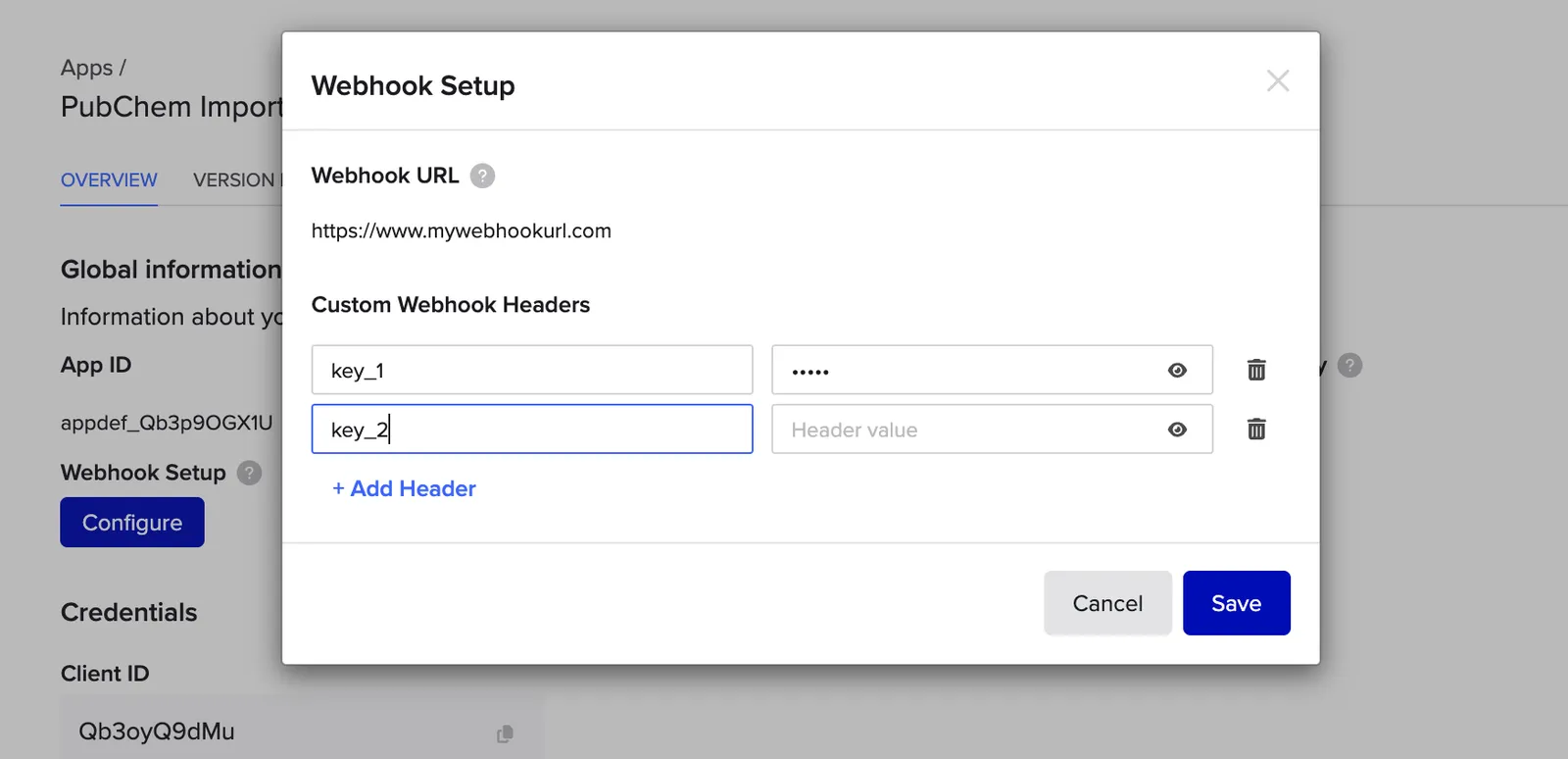
The webhook setup form with fields for the webhook URL and custom headers
Webhook setup in Feature Settings > Developer Console > Apps

Benchling will include these headers in every webhook request sent to your URL.